
Under the hood: Bonx AI agents
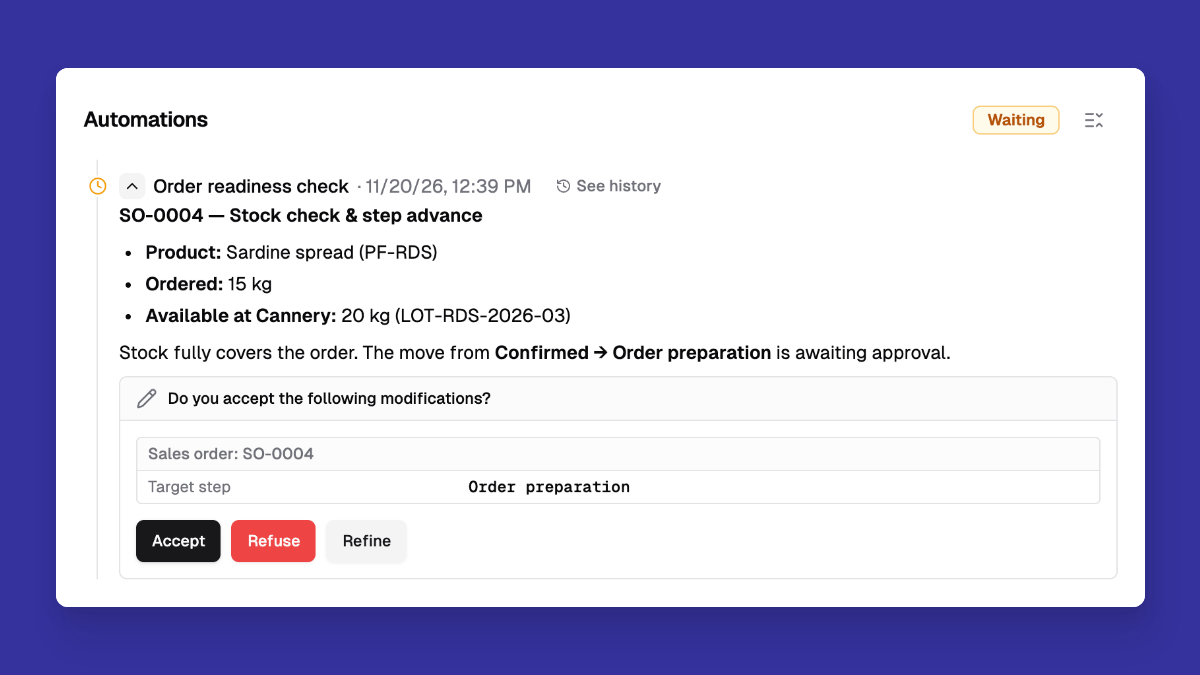
Bonx is the AI-native manufacturing ERP, which means it’s designed to allow AI agents to work through a business process from start to finish. An agent uses the records your team works with and the rules you set to decide what needs to happen next. It can even take the actions you’ve authorized and bring only the exceptions to your team.
In this article, we’ll look at how Bonx AI agents work in practice, including what an agent can access, which actions you can let it take on its own, and when it needs your approval. Then we’ll follow a food manufacturer’s order from intake to invoicing to see how AI agents handle work in a real-life scenario.
AI agents in Bonx works at two levels. As a first step, it can act on specific, singular tasks or jobs. We always advice customers to start here, and once comfortable, move to automating entire workflows (e.g., order to cash via the Bonx sales agent). We’ll look at these two cases below.
Note that in addition to AI agents, Bonx has other AI features. This includes:
We won’t cover these features in depth in this article, though you can read more about the different types of intelligence and AI in Bonx here.
To set up an AI agent for a specific task, simply describe an agent’s job in natural language and attach it to a process step or business event in Bonx. At the quoting step, for example, an agent can check the information needed for a quote and prepare the next action (e.g., suggest a price based on your pricing rules or draft the email that goes with the quote).
While next actions will be prepared by the AI agent, in this “manual mode,” humans always review before any action gets taken. In other words, in the example above, the quote that was prepared would not actually be sent until a human reivewed.
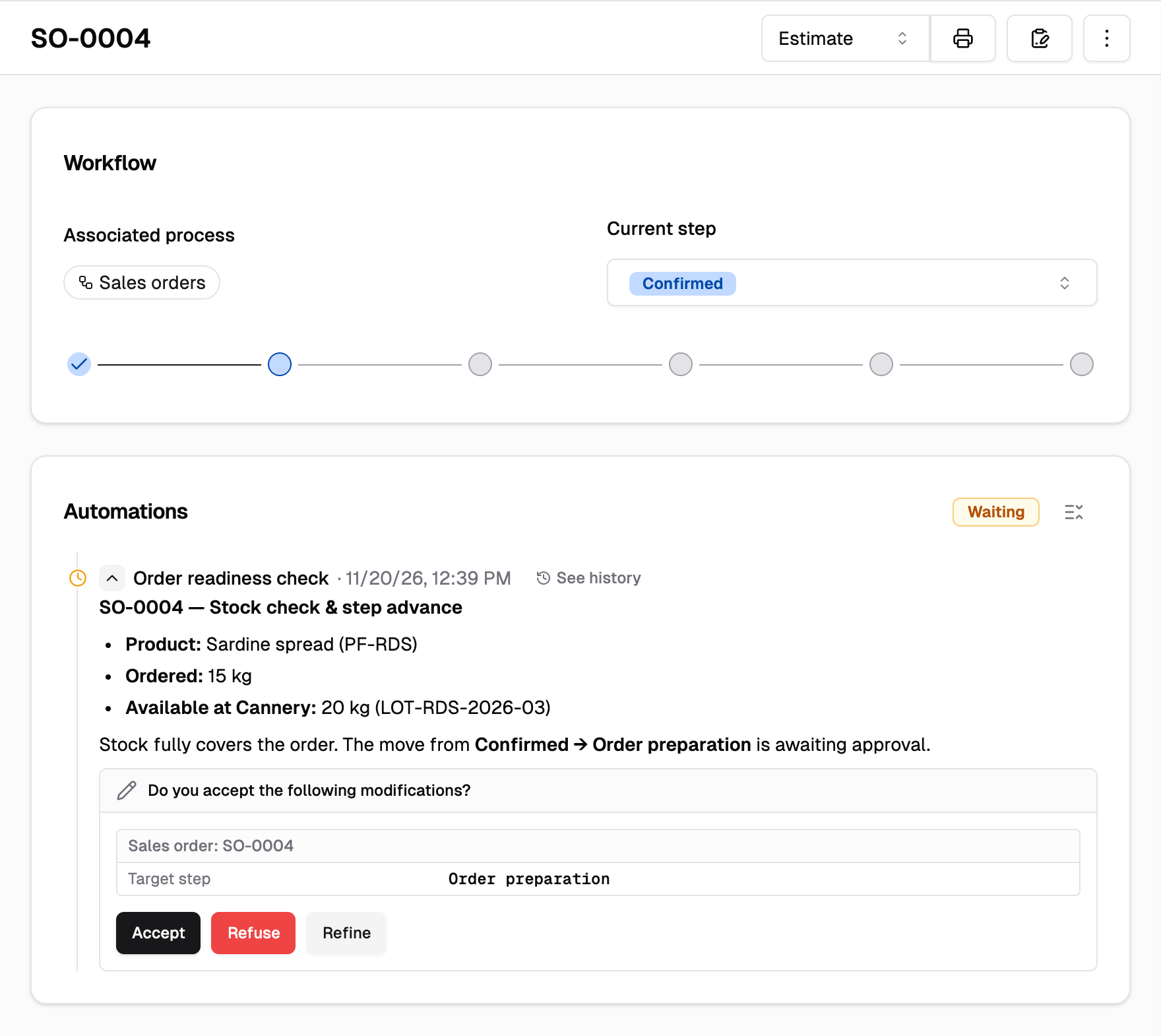
Once the team is satisfied with how an agent handles its assigned work with manual human approval, a manager can authorize automatic execution. That means the agent no longer waits for someone to accept each covered action, though anything that doesn’t meet the conditions will still be escalated for human review.
For example, once you’ve authorized Bonx to reserve stock, it can do so whenever an order meets your rules, without asking someone to approve each reservation.
Some Bonx customers take their first steps into letting AI agents run automatically in tasks where a given event always triggers the same action. For example, Bonx can issue and email an invoice as soon as the warehouse confirms a shipment. In this case, note that an agent can also account for customer-specific instructions, like If a customer asks for one invoice for the whole order, the agent can check what’s already shipped and wait until the final shipment is confirmed before sending the invoice.
Bonx can also handle an entire process from start to finish automatically (as opposed to just a single step in a process). In order to cash, for example, the Bonx sales agent can enter incoming orders, reserve stock, prepare shipments, and invoice customers for what actually shipped, all automatically, if configured to do so. Your team always remains in control, deciding which steps can run automatically and which decisions the agent should bring to a person.
What’s important here is that AI agents can be set up by anyone with the permissions to do so without requiring an IT or consulting project. For example, at Bonx customer L’Atelier du Ferment, the team used to track when orders came in and when they needed to ship manually on a physical calendar. When they decided they wanted to digitize and automate the process, supply chain and logistics manager Emeline Chambard wrote the AI agent’s instructions herself using the shipping rules her team already followed. The agent now uses those rules to assign ship dates in Bonx, where the warehouse team can see them.
If you’re hesitant or skeptical of using AI to run entire processes in your operations, or even specific tasks, it’s understandable. What if something goes wrong? The sometimes uncomfortable reality is that if humans are doing the work today, mistakes (e.g., incorrect data entry) are likely already happening.
Bonx builds checks into the process itself so your team can review sensitive actions before they happen and see what changed afterward. We also always recommend that our customers start in “manual mode,” that is, reviewing all actions before turning on AI agents for a job or process. This ensures you and your team are comfortable with the proposed actions.
Other common questions about AI agents in Bonx include:
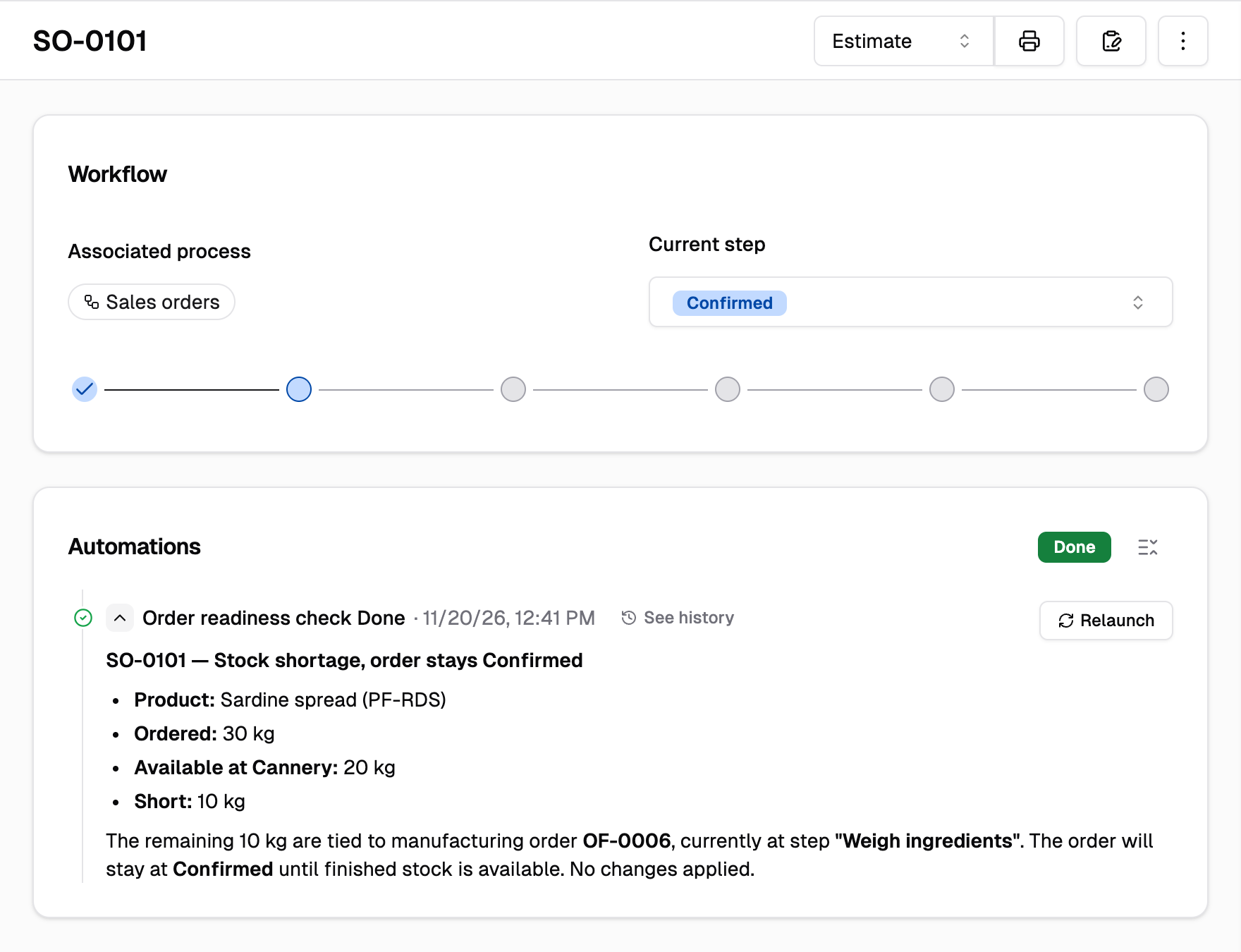
Only managers can set up agents in Bonx. They define the agent’s job and choose which actions can run automatically and which require approval. Each agent runs under an assigned profile, and Bonx checks that profile’s permissions every time the agent tries to act. For example, an agent with permission to draft an invoice still needs invoice approval rights to finalize it, even in automatic mode.
The run history shows what the agent proposed, how the proposal was approved, and what the agent actually did. You can also open the affected record to see what changed. If a ship date moves, for example, the order’s history tab shows the old date, the new date, when it changed, and who or what made the change.
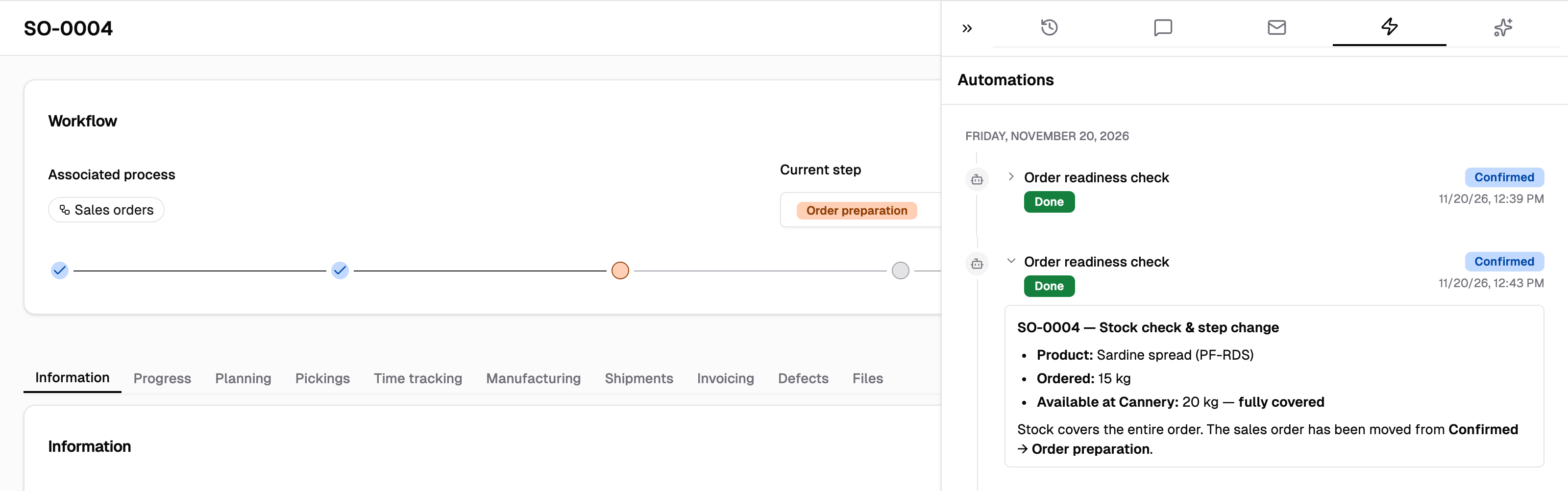
Bonx checks the permissions of the profile assigned to the agent each time it tries to take an action. For example, if that profile can create a draft invoice and invoice approval is reserved for a different role, the agent can prepare the draft and leave it for someone with approval rights. Those same checks apply in automatic mode.
Your team can set rules for when an agent should pause. Say the regular carrier will miss a customer’s promised delivery date. A dedicated truck can get there on time, but at a higher cost. The agent can bring both options to the sales team so someone can decide whether to pay for the truck or agree on a later delivery with the customer.
The agent’s run history shows what it proposed, what was approved, and what happened when it tried to carry out the action. The order’s history shows which fields actually changed. If a ship date looks wrong, your team can check whether the agent only suggested a new date or updated the order, then correct the record or adjust the agent’s instructions as needed.
For delivery-note extraction, Bonx uses an external AI provider under private processing terms that prohibit using the submitted documents to train its models. What Bonx learns about your operation stays private to your company.
No. An agent can only act through the tools Bonx gives it. When it uses a tool, Bonx’s code checks what the agent is allowed to do and applies the rules for that action. For example, the agent can ask how much stock is available to reserve. Bonx calculates the answer from the inventory records, and the agent uses that number to decide what to do next.
Let’s look at a realistic use case and see how Bonx AI agents help.
A customer sends a food manufacturer a purchase order for jars of spread. The quantity and delivery date are already agreed, but the manufacturer has only part of the order in stock. The sales administrator needs to work out what can be reserved now and whether production can make the rest in time.
We’ll follow the order from the moment it arrives to the point when it’s invoiced. At each step, we’ll see what the Bonx agent checks, what it can do on its own, and when the sales administrator needs to step in.
Bonx pulls the order details from the retailer’s PDF purchase order. The sales administrator checks the products, quantities, and prices against the original and confirms the import.
Once the order is in Bonx, the agent checks the retailer’s email for delivery instructions. The retailer wants all 500 jars delivered together, so the agent checks whether the full order can be ready in time for Friday’s delivery.
The agent finds 300 jars in stock. The other 200 won’t be ready until Friday morning. The manufacturer’s usual carrier collects orders on Thursday for Friday delivery, so the full order will miss that truck. The next regular truck would deliver the following Friday, a week after the agreed date. A dedicated truck could collect all 500 jars on Friday morning and still deliver them that day, but at a higher cost.
The agent brings two options to the sales administrator. Pay for the dedicated truck to keep the Friday delivery, or ask the retailer to agree to a later date. The administrator approves the extra freight cost and books the truck. Once the batch is ready, the agent proposes reserving all 500 jars for the order, and the administrator approves the reservation.
In this case, the sales administrator had to decide whether keeping the Friday delivery was worth the extra freight cost, but we could imagine many other scenarios. For example, the agent could ask for approval on a pricing decision based on quoting rule documented in plain language.
The warehouse team picks all 500 jars and scans the batches, which confirms exactly what shipped in Bonx. The agent then prepares one invoice based on the confirmed shipment. The sales administrator approves it, the agent emails it to the retailer, and Bonx passes it to the connected accounting tool for posting.
What differentiates Bonx is not just that it can automate operational work but that it continues to get smarter over time. For example, the same order may follow different rules depending on the customer. One customer is invoiced at shipment; another has a different commercial arrangement.
Bonx has a continuous learning loop that turns your operating history into readable business policies to identify patterns that are perhaps not so cleanly documented. Those policies can guide when to confirm an order, prepare a shipment, issue an invoice, etc., in any given situation. The team can of course also supply instructions directly and review and refine the policies available to the agent.
When a person corrects the way an exception is handled, the learning loop uses that feedback to improve guidance for later orders. A new type of order may prompt a proposed policy change so the team does not have to make the same correction each time.
The goal is for Bonx agents to handle routine work according to your rules, so your team only steps in when a decision needs their judgment. Once you’ve authorized routine steps to run automatically, the agent can reserve stock, prepare shipments, send invoices, and much more. That’s how our customers can do 2x-4x the operational work with their existing team.
When an exception comes up, like whether to pay for a dedicated truck to keep Friday’s delivery, the agent brings your team the options and the tradeoff so they can make the call. If you’re ready to go further, get in touch to see the Bonx sales agent in action.
---


Contact us
So were we. That's why we built Bonx, the AI-native manufacturing ERP.