Turn demand into purchase & manufacturing orders with MRP II in Bonx
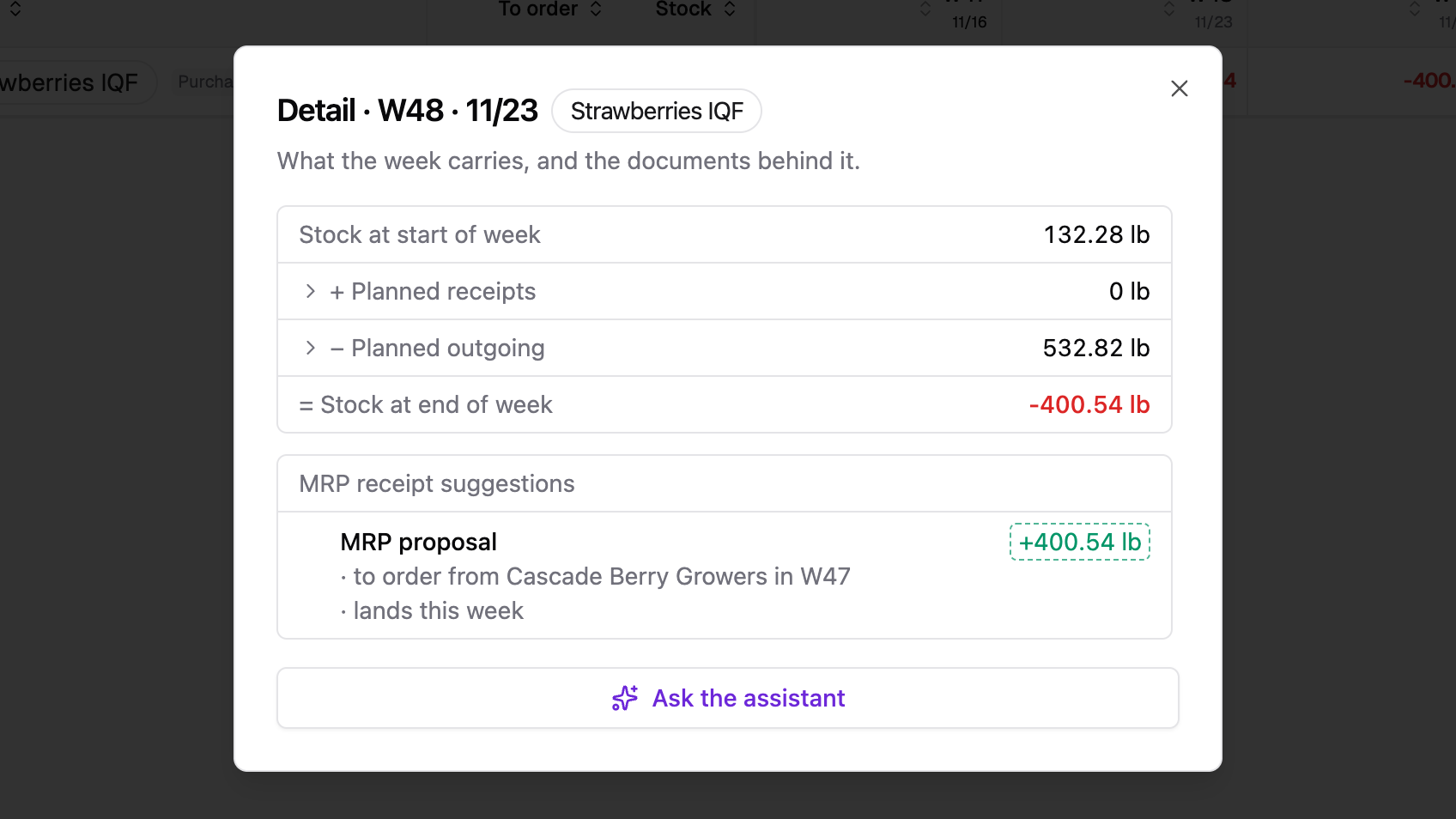
A customer order can be confirmed weeks before the factory launches production, and in that time, the buyer has to work out what’s on hand, what’s already committed to other orders, and what’s due to arrive before the batch runs. Some components need to be ordered right away because of long lead times. Others, such as perishable ingredients, need to arrive closer to production. Waiting for a manufacturing order to see what the batch requires leaves less time to make those calls.
Bonx is the AI-native manufacturing ERP whose manufacturing resource planning (MRP II) flow calculates what to make, what to buy, and when, using confirmed customer orders, stock, incoming deliveries, and lead times.
This article walks through the basics of MRP II in Bonx using different scenarios and constraints to show how buyers can can see what needs ordering before it holds up production. It also shows what makes Bonx different from other MRP II solutions, by giving teams the power to configure routine planning and purchasing steps to run automatically with AI agents.
Confirmed orders coming in via the Bonx sales module, whether they come by email, manual entry, EDI, the e-commerce platform, etc., feed the weekly production and purchasing views. Once an order is confirmed (like for cases of strawberry preserves in the examples here), Bonx calculates demand for finished product in production and for its ingredients or components (in this case strawberries, jars, and labels) in purchasing before a manufacturing order even exists.
That gives the buyer time to check whether stock and incoming deliveries will cover the batch as well as to order long-lead components while production decides when to start.


Different products can draw from the same stock of an ingredient or component. Suppose a food manufacturer has two confirmed orders for the same week. Keeping with our example, let’s say one is for jars of strawberry preserves and the other is for jam-filled shortbread cookies. Both bills of materials (BOMs) call for the same bulk strawberry preserve, but the company packs some into jars and uses some to fill the cookies.
If the jars need 30 lb of preserve and the cookies need 20 lb, Bonx combines them into a single 50 lb requirement. In our example, with 35 lb of bulk preserve available that week, they need to make at least 15 lb more.
Bonx then uses the bill of materials to work out what the additional batch needs. In this example, that means strawberries and sugar for the extra preserve. It checks available stock in the Bonx inventory module and applies minimum purchase quantities when suggesting what to buy.

An ingredient or component can be in stock today but run short when several orders draw from the same supply. With Bonx, the buyer can trace the projected shortfall to the production orders that depend on the item and check which deliveries are due before production.
To do this, the Bonx planning module works backward using manufacturing and supplier lead times. A component needed for production in a particular week may need purchasing several weeks earlier, so the purchase recap shows an order-by date alongside each requirement, giving the buyer a date to act on.
Lead-time settings in Bonx can also reflect differences within a supplier’s catalog. In our food manufacturing example, their supplier Atlantic Glassworks has a 14-day lead time for labels and a 28-day lead time for four-jar gift boxes. If they need both items on the same date, Bonx gives the gift boxes an order-by date two weeks earlier. Suppliers can also have a default lead time, though the item lead time will override it when relevant.
The buyer can see where the requirement came from and how its timing was calculated. If a supplier’s lead time has changed, updating it gives future purchase suggestions the right date to work from.
A proposed manufacturing order may have enough of most components while one purchased item cannot arrive in time. Bonx identifies late components against the proposed order, so the planner can see exactly what is putting the plan at risk.
Planning also flags requirements that cannot be supplied because no supplier is available. Purchasing can then find a viable source or reconsider the timing before launching work that depends on the missing component.
A component supply warning addresses material availability alone. The planner still needs to check the other production constraints before committing.

In the purchase recap, Bonx recommends the cheapest supplier among those able to deliver on time and explains the choice. The buyer can change the supplier line by line before launching purchases.
In some cases, the lowest quote may come from a supplier who would deliver too late, in which case Bonx may recommend a higher-priced supplier who can meet the date.

Purchase suggestions also follow the minimum order quantities and ordering increments set in the Bonx purchasing module. For example, if a minimum order is 650 units and the buyer only needs 500, the system will automatically suggest ordering the minimum (650 units).
The buyer can always check the purchasing rule attached to the item before confirming and account for the stock left after meeting the immediate requirement. If the commercial terms change for a specific supplier, updating those rules is a simple configuration (no IT, no long project), and changes the basis for later suggestions.
Once the buyer selects the requirements to cover and confirms the suppliers, Bonx uses those selections to build draft purchase orders by supplier or add the lines to an eligible open order.
To create a purchase order from the planning module, Bonx needs a purchasing workflow for the item. That workflow sets the steps the order goes through, such as approval before it’s sent to the supplier.
On the production side, the planner reviews the proposed manufacturing orders, checks component availability, and adjusts quantities before launching several orders together. Purchasing and production can commit to the work from the requirements already calculated in the planning module. The Bonx production module tracks the manufacturing orders once they’re launched.
We always recommend that customers start with a manual workflow, checking whether Bonx’s suggested quantities, dates, and suppliers match what your team would choose. If you regularly override a suggestion, check and adjust the rule it came from before automating the next step. The Bonx adaptability page covers how to configure workflow steps and approvals, but bottom line: it doesn’t require a consulting or IT project to make changes.
Most of our customers start in “manual mode” but then quickly realize they are approving Bonx’s suggestions with no modification. In that case, Bonx is built to automate those parts of the process, leaving only exceptions or edge cases for human review.
Here are just a few examples of routine tasks Bonx’s automation and AI agent functionalities can handle:
If you want to see how Bonx can help you automate operational work with AI, including parts of your MRP II process, request a personalized demo or watch the on-demand demo of Bonx for planning and scheduling demo.



Contact us
So were we. That's why we built Bonx, the AI-native manufacturing ERP.