How to automate purchase orders without losing control of supplier relationships

The amount of manual tasks around purchasing in manufacturing operations, including (but certainly not limited to) turning production need into supplier asks and emails, rechecking stock, chasing confirmations, and more, signals it's ripe for automation and an AI efficiency boost.
But as with many AI use cases, poor automation around purchase orders (POs) especially can be riskier than none at all. If people don't trust the system or humans aren't kept in the loop at the right moments, mistakes can propagate and be difficult to catch, so it's understandable that purchasing teams are skeptical.
Manufacturers need PO automation that keeps supplier context, approvals, and operational visibility in view. Buyers do not necessarily need to touch every routine order, but they do need to see the risky decisions early. This article will show how you can think about automation around purchasing and the PO process as well as where AI is best suited to free up people's time to work on the tasks only humans can do.
Bad PO automation often starts from a real frustration. The team is tired of manual ordering, so the business adds rules. When stock drops below a threshold, create a purchase order. When a requisition is approved, send it to the supplier. When a planned order appears, convert it into a PO.
That can work for simple items in stable conditions, but it often breaks down because rules-based automation by definition doesn't take any other operational context into account.
In these simple systems, a reorder rule may count stock that is on hand but blocked by quality. A supplier lead time may sit in the item master long after the supplier has started slipping by two weeks. A system may create a PO for the preferred supplier even though recent deliveries have been late... the list goes on.
This is where many PO software projects disappoint operations teams, because the system automates the building of the PO document itself, but it still relies on the human for the contextual details. The actual PO document might be done faster, but a human still has to explain why the order changed, why the requested date is unrealistic, why a partial delivery is suddenly urgent, why the material is no longer needed, etc.
Rules-based automated approval workflows can create the same false comfort. If approval is based only on spend thresholds, the system may route a $20,000 purchase to finance while letting a low-value but production-critical component move through without review. In manufacturing, operational risk does not always follow purchase value. A small missing part can stop a line faster than an expensive buy that is not urgent.
If buyers cannot see why a PO exists, why that supplier was chosen, and what happens if they change it, automation can make the PO creation faster, but it doesn't necessarily make purchasers' jobs easier.
AI has fundamentally changed the game around automation, making it possible to layer context and nuance on top of a rules-based approach. In addition, AI-native systems like Bonx can learn and get better over time as they see more context around your operations.
Here's what you should be looking for in a system that helps make your purchasing team, and specifically PO work, more efficient.
A PO, of course, tells a supplier what you want to buy, in what quantity, at what price, and by when, but the decision behind it is wider. Before a buyer sends the PO, someone has usually checked demand, available stock, open purchase orders, supplier lead times, minimum order quantities, production timing, quality status, and sometimes cash constraints.
More often than not, this work is manual. Someone might export a material requirements planning (MRP) recommendation, check inventory in another tool, ask whether production has moved, search email for the last supplier confirmation, then create the PO line by line. Experienced buyers can make that work with a combination of years of practice and know-how, but it's easy to see the process becomes fragile as the company grows.
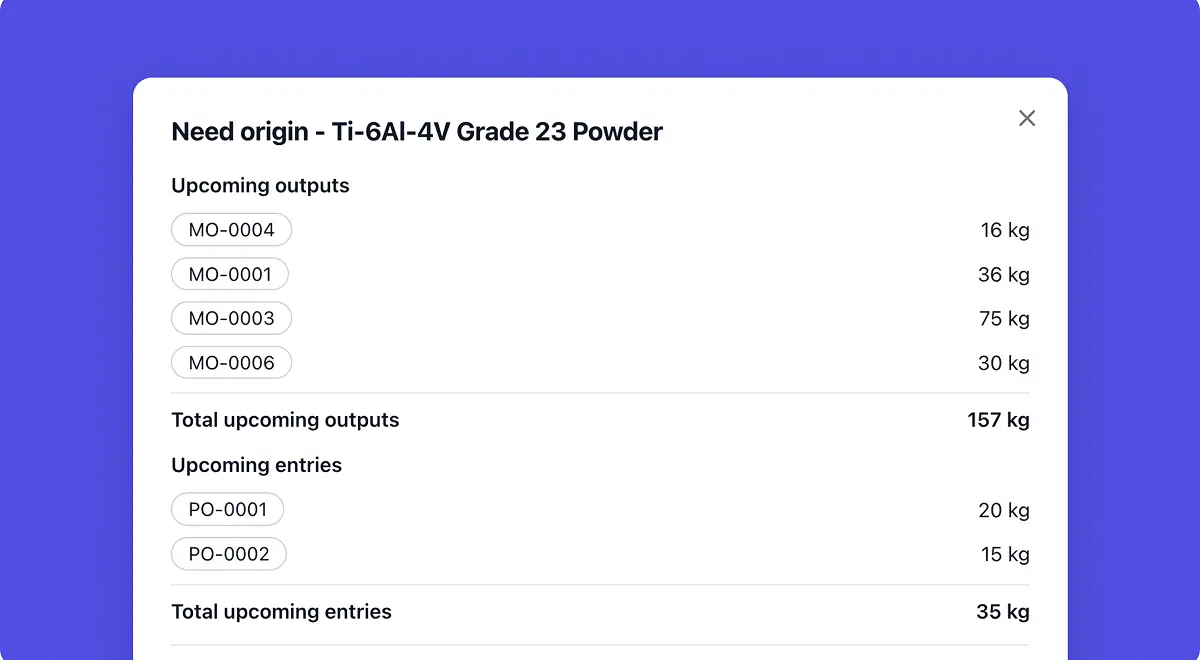
Good purchase order software reduces that manual translation work. It connects the purchasing decision to the signals that created it: sales orders, forecasts, bills of materials, available stock, reserved stock, quality-blocked stock, open supply, lead times, and production needs.
That is why PO automation cannot sit too far away from the manufacturing operation. A standalone approval tool can help with spend governance, but it may not know whether the item is needed because a customer order came forward, a batch failed quality control, or a supplier is already late on another order, all of which might impact the purchasing decision.
Bonx is the AI-native manufacturing ERP that connects all your operational work. That includes PO flows, which are closely tied to order management, inventory, purchasing and supplier management, planning, production, quality, traceability, and logistics. The system does more than store POs after someone creates them; it helps turn operational signals into purchasing work the team can inspect, approve, and adjust.
For a deeper planning view, Bonx has a separate guide to what MRP software does and where it should sit in manufacturing ERP. Our philosophy on purchasing is the same: an AI-generated or automated purchasing recommendation is useful only when the system understands all your operational data.
In addition to bringing in context from the rest of your operations, good PO automation software also considers supplier management part of its remit.
Doing all your supplier work manually might sound like a good decision because you're afraid to harm supplier relationships and trust, which are obviously critical. But it's important to note that manual purchasing can damage supplier relationships too when it creates late orders, unclear changes, duplicate requests, poor forecast visibility, and rushed calls.
Automation and AI can actually help supplier relationships when it makes the buyer better informed. For example, a buyer should not have to remember that one supplier is reliable for standard components but weak on urgent orders, or that another supplier is approved for one item family but has open quality issues on recent receipts. The system should bring that context into the purchasing decision.
Supplier management software should show which suppliers are approved for the item, what lead time the team expects, how the supplier has performed against recent delivery dates, whether open orders are already late, and whether quality has flagged recent receipts.
This does not make the relationship less human, it just gives the human a better starting point. For example, if a buyer calls a supplier about a late component, the conversation changes when they can see open purchase orders, delivery history, impacted production orders, and customer commitments in the same operational context. The buyer can ask for the right help earlier, and the supplier gets clearer information.
For manufacturers, supplier relationships are part of operational capacity. A supplier who confirms realistic dates, warns early, and understands your constraints is often more valuable than a supplier who looks slightly cheaper in the item master. Procurement software should help the team see that difference before the next PO is sent.
A good system makes the difference between routine purchasing and purchasing that needs human judgment, speeding up the former exponentially so that the team has more time to spend on the latter.
Routine purchasing is work the system can handle under approved rules. For example, the item is approved, the supplier is trusted, the lead time is normal, the price matches the agreement, and there are no quality holds, demand shocks, or production changes that make the recommendation unusual.
In that case, procurement software should prepare the PO, group needs where appropriate, apply the right supplier and price, and move the order forward with little manual effort. Depending on the company's approval policy, the system may create a draft for quick review or send the PO automatically within defined limits.
The buyer should spend more time on exceptions: an urgent buy inside normal lead time, an abnormal quantity, a price change, a new supplier, a substitute material, or an item linked to a quality-sensitive customer order.
At food manufacturer L'Atelier du Ferment, Bonx helps generate procurement suggestions from sales, shelf life, and cold storage capacity, Bonx also supports traceability across more than 100,000 bottles. That is the pattern manufacturers should look for. The system prepares purchasing work from real constraints, and the team keeps visibility over the decisions that are safe to automate or need review.
Buyers do not trust automation they cannot question, and nor should they. If PO software recommends buying 4,800 units from supplier A for delivery in week 36, the buyer needs more than a line item and an approval button. They need to know why that quantity, why that date, why that supplier, and what risk the recommendation is trying to prevent.
An automated PO recommendation should show:
If the recommendation cannot be explained, your buyer will check it manually, and all the time saved from having an automated system is lost.
Purchase order automation should not end when the PO leaves the building. The supplier may confirm the date, reject the date, partially confirm the quantity, change the packaging, ask for a price correction, or ship late. Receiving may find a quantity mismatch. Finance may need the correct receipt information for the accounting tool.
If those events do not flow back into the purchasing system, the next recommendation will be built on stale assumptions. A closed-loop purchasing workflow connects the full path:
When those records live in separate tools, and not in a connected manufacturing ERP, the buyer has to keep reconciling what the system thinks with what actually happened.
If you're looking for purchase order software, you must go beyond "does it automate POs?" Most tools can create documents, route approvals, and send supplier emails.
Instead, look for a system that can automate the right work while keeping judgment where it belongs, with your human buyers. For a manufacturer, purchase orders should come from live operational demand, carry a clear explanation, account for supplier performance, and connect back to inventory, production, quality, and logistics after the order is sent.
The best procurement software does not remove people from supplier relationships. It removes the manual checking, copying, and chasing that gets in the way of managing those relationships well.
For manufacturers, purchase order automation should move the team from execution to oversight: fewer routine touches, clearer exceptions, and more control over the suppliers the business depends on.

Contact us
So were we. That's why we built Bonx, the AI-native manufacturing ERP.