What is reorder point, and how do you stop calculating it manually?

A reorder point is the inventory level that tells a team when to replenish an item. If stock falls to or below that level, the business should place a purchase order, launch production, or prepare another replenishment action before the item runs out.
The basic formula is simple:
Reorder point = Demand during lead time + safety stock
Of course, the hard part is not the math, but keeping the inputs current enough for the rule to protect production, purchasing, and customer promises.
This article explains how to calculate reorder point, what counts as usable stock in manufacturing, why manual calculations break, and what changes when your enterprise resource planning (ERP) system knows current stock, lead times, demand signals, supplier rules, and production constraints at the same time.
Reorder point can apply to raw materials, components, packaging, semi-finished goods, or finished goods. It matters most when an item has regular demand, a meaningful replenishment lead time, and real consequences if it is not available when production or a customer order needs it.
The goal is not to reorder when the shelf is empty, but rather to do it early enough that new supply arrives before normal consumption and uncertainty create a stockout. A good trigger level answers a practical question: if we keep consuming this item while waiting for the next replenishment, how low can usable stock get before we have to act?
You can write the reorder point formula as:
Reorder point = (Average daily demand x lead time in days) + safety stock
Here is a simple example.
A manufacturer uses 40 units of a component per day. The supplier usually takes 12 days to deliver. The team holds 150 units of safety stock.
The calculation is:
(40 x 12) + 150 = 630
That means the team should reorder when available stock reaches 630 units.
The first part of the formula covers expected consumption while the business waits for supply. The safety stock covers uncertainty: demand spikes, late suppliers, production scrap, quality holds, or other operational surprises.
If you want the deeper safety stock calculation, we covered it separately in this practical guide to safety stock. For replenishment timing, the important thing is the relationship between the two numbers. Safety stock protects the business from uncertainty; reorder point turns that buffer into an operating rule.
Before a team automates reorder points, it has to decide which stock counts toward the trigger. Counting physical quantity alone is usually too blunt for manufacturing. The ERP may show 1,000 units, but the real replenishment decision depends on how many of those units are available, reserved, blocked, expired, quarantined, in transit, allocated to a customer, or sitting in the wrong location.
A batch can be physically present but unavailable because quality blocked it. Stock can be in the building but reserved for another order. A pallet can exist but be too close to expiry for a customer. A component can be in transit, expected tomorrow, and still not safe to count for a production order due this afternoon.
At minimum, the calculation should distinguish:
This mirrors the FIFO and LIFO problem in manufacturing inventory. The accounting method matters, but the operation also needs to know which batch can move, which lot is eligible, which material is blocked, and which stock should not be touched. We covered that split in the manufacturing guide to FIFO and LIFO.
The formula only helps if "stock" means the stock the business can use for the demand it is trying to protect.
Again, the formula does not fail because the math is hard. It fails because the inputs drift. Demand changes when sales accelerate, forecasts move, customer orders are pulled forward, or a new channel starts consuming more stock than expected. Supplier lead times change when a vendor gets busy, minimum order quantities shift, transport takes longer, or the buyer switches supplier. Available stock changes when inventory is reserved for another order, blocked by quality, consumed by production, returned, scrapped, moved, counted, or corrected.
Each of those changes should affect the reorder decision. In many companies, they do not.
The buyer still reviews the same export every Monday. The planner still trusts a lead time entered six months ago. The warehouse corrects stock after a count, but the replenishment file does not update until someone refreshes it. Production consumes more material than planned, but purchasing only sees the shortage when someone asks where the component is.
Manual management usually starts with good intent. A spreadsheet gives the team a rule, a shared reference, and a way to move away from gut feel. Then the business outgrows the review rhythm, and the failure modes are familiar:
None of this means the team is careless, it just means the business is asking people to keep a live operational rule alive inside static data.
And unfortunately, the larger the item catalog, the worse the problem gets. Ten trigger levels can be reviewed by a careful buyer, but hundreds or thousands turn into a permanent maintenance task, and the team starts choosing between two bad options: update the parameters constantly, or accept that some of them are wrong.
There is also a timing problem. A spreadsheet usually tells the team what should have been ordered after the risk has already appeared. A better system should warn buyers before the supplier miss, stockout, or production interruption shows up downstream.
That is the same lesson behind supplier OTIF. The useful version of the metric is not the scorecard after a supplier fails but rather the early-warning system that shows which purchase order line, production order, material, and customer promise are at risk before the miss happens. Reorder point should work the same way in that the trigger is the point where the system should start the next replenishment action while there is still time.
Reorder point tells you when to replenish, while reorder quantity tells you how much to replenish. That distinction is important because the trigger alone does not decide the purchase order or production quantity. Once stock reaches that level, the team still has to consider minimum order quantities, supplier price breaks, container sizes, production batch sizes, shelf life, storage space, working capital, and expected future demand.
For a stable component, the business may reorder a fixed quantity every time. For a seasonal finished good, it may replenish enough to cover a forecast window. For a perishable ingredient, it may deliberately order less than the economic quantity because expiry risk matters more than the unit price.
This is where manual work creeps back in. The spreadsheet may tell a buyer to reorder, but the buyer still has to check demand, stock status, open purchase orders, supplier constraints, and production needs before acting. If those checks happen in different tools, automatic reordering becomes risky instead of useful.
In other words, the trigger says "act now,” but the buyer still has to decide whether to place a standard purchase order, split the order, switch supplier, order a larger quantity to meet a minimum, reduce the quantity because shelf life is tight, or ask planning whether production should resequence. The system should help with that decision instead of only raising a flag.
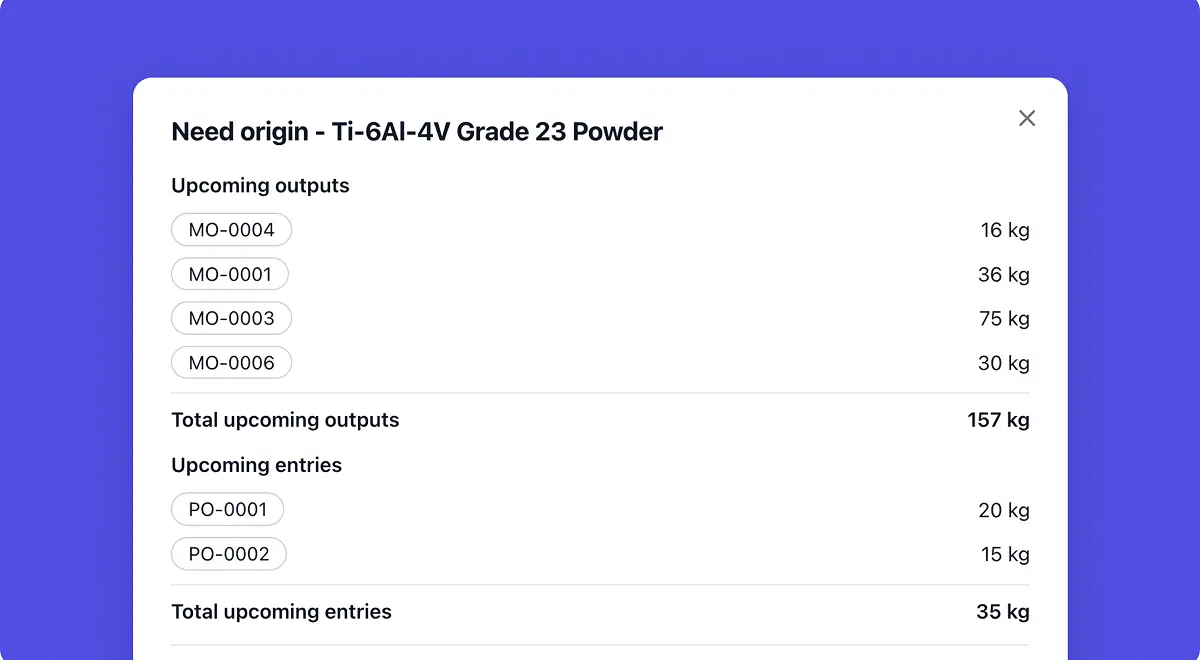
In manufacturing, inventory does not simply go down until someone orders more, of course. It changes because operational events happen. For example, a sales order reserves finished goods, a production order consumes components, aquality hold makes physical stock unavailable, a cycle count corrects a variance, a production scrap declaration changes the real material need, etc. Each event can change whether an item has reached its reorder point.
This is why periodic reviews are fragile. If the calculation only runs once a week, the business may spend several days acting on the wrong picture. If it runs every night but ignores quality status, reservations, supplier confirmations, or production consumption, it is still only a faster version of the same weak rule.
The better version is event-driven. When stock moves, demand changes, quality blocks material, a supplier updates a date, or production consumes more than planned, the system should re-evaluate coverage and decide whether a replenishment action is needed.
That does not mean every change creates a purchase order. It means the system keeps the rule close to the work that changes the rule.
Automatic reordering does not mean letting software buy blindly, which would obviously be reckless and risky. It does, however, mean the system can prepare or trigger routine replenishment work inside rules the team has approved, then ask for human validation when the decision carries risk.
For automatic reordering to be useful, the system needs more than an item master and a stock number. It needs to know:
When those inputs live together, the replenishment trigger stops being a parameter someone reviews after the fact and instead becomes an operating rule the system can watch continuously.
The buyer's job changes too. Instead of rebuilding the same calculation, checking the same stock exports, and chasing the same supplier updates, the buyer reviews exceptions: a supplier delay, a demand spike, a proposed order that breaks a minimum quantity rule, or a material shortage that threatens a customer promise.
Bonx is an AI-native manufacturing ERP that connects order management, inventory, purchasing and supplier management, planning, production, quality, traceability, and logistics in one operational system. For reorder point management, that means the system can act on current operating context instead of waiting for someone to rebuild the calculation in a file.
Bonx inventory intelligence monitors stock movements and demand, evaluates coverage risk, and helps route replenishment recommendations for validation or adjustment. That gives teams a better way to manage these rules because they sit closer to the events that change them: reservations, consumption, supplier delays, demand changes, and quality status.
The procurement side matters just as much. Bonx procurement control brings purchasing work into the same operational flow, so procurement actions can be prepared from real stock, demand, supplier, and production context rather than a buyer's manual reconstruction.
Food manufacturer L'Atelier du Ferment connected production, purchasing, shelf life, cold storage capacity, and batch traceability with Bonx. Bonx helps the team generate manufacturing orders and procurement suggestions based on sales, shelf life, and cold storage capacity while supporting traceability across more than 100,000 bottles.
That is the difference between a system of record and a system of action. A system of record stores the reorder point. A system of action watches the conditions around it, prepares the next replenishment step, and brings people in when judgment matters.
In practice, that means the trigger is no longer isolated from the rest of the operation. A low stock signal can be evaluated against production demand, customer promises, open purchase orders, supplier rules, quality status, shelf life, and storage constraints before the system prepares the next action.
A reorder point is the inventory level that triggers replenishment. When stock falls to or below that level, the business should place a purchase order, launch production, or prepare another replenishment action before the item runs out.
The basic reorder point formula is: reorder point = demand during lead time + safety stock. A common version is: reorder point = (average daily demand x lead time in days) + safety stock.
If a manufacturer uses 40 units per day, supplier lead time is 12 days, and safety stock is 150 units, the reorder point is (40 x 12) + 150 = 630 units. The team should reorder when available stock reaches 630 units.
Safety stock is extra inventory held to protect against uncertainty. Reorder point is the stock level that tells the team when to replenish. Safety stock is part of the reorder point formula, but the two terms do not mean the same thing.
Reorder point tells you when to replenish. Reorder quantity tells you how much to replenish. After an item reaches its reorder point, the team still has to decide the quantity based on supplier rules, batch sizes, storage space, shelf life, working capital, and expected demand.
Yes. A manufacturing ERP or live inventory system can calculate reorder point automatically when it has current demand, inventory status, supplier lead times, safety stock rules, and open replenishment data. The formula remains the same, but the inputs stay closer to operational reality.
Bonx is an AI-native manufacturing ERP that connects inventory, procurement, planning, production, quality, traceability, and logistics. With Bonx inventory intelligence and Bonx procurement control, teams can monitor stock and demand, evaluate coverage risk, and prepare replenishment actions for validation or adjustment.

Contact us
So were we. That's why we built Bonx, the AI-native manufacturing ERP.