ERP software guide 2026: the basics for manufacturing SMBs and SMEs

An ERP should make it easier to grow a manufacturing business. If it mostly adds admin, forces people to update records after the work is done, or turns every process change into a project, it is missing the point.
That is the useful starting point for an ERP software guide. Before comparing vendors, modules, and acronyms, a manufacturing SMB or SME needs to understand what the system should actually do for the business: connect the operational work, reduce manual coordination, and help the team act faster without losing control.
SMB is the common term in the US; SME is used more often in Europe. In this guide, both mean the same practical audience: small and mid-sized manufacturers that have outgrown informal coordination but do not want enterprise software weight.
The sections below cover the basic terms, the main ERP types, the modules that matter in manufacturing, and the checks to run before choosing a system.
Enterprise resource planning (ERP) software is a business system that connects the work, data, and processes a company uses to operate. In manufacturing, that can mean customer orders, purchasing, inventory, planning, production, quality, traceability, internal logistics, finance, reporting, or some combination of those areas.
That range is why ERP gets confusing. One ERP may be finance-centered, built mainly around accounting, invoicing, and financial control. Another may be operations-centered, built around the flow from order to production to shipment. Some vendors try to cover everything in one platform.
For manufacturers, the important question is not whether the product can be called an ERP. The important question is whether it helps the team run the factory better.
At a basic level, manufacturing ERP software should help answer questions like:
Older ERP systems were mostly systems of record. They stored information so the business could report on what happened. A modern manufacturing ERP still needs that reliable record, but it should also behave more like a system of action: generating work, triggering routine steps, flagging constraints, and bringing humans in when judgment is needed.
Growth does not usually break a manufacturer in one dramatic moment. It adds more orders, more variants, more suppliers, more stock movements, more quality checks, and more promises to keep. The ERP should remove some of that coordination burden, not create another place where the team has to perform admin after the real work is done.
Manufacturing ERP software has to deal with physical constraints. Materials can arrive late, machines have capacity limits, operators need current instructions, stock changes location, and a quality hold can affect what planning and shipping are allowed to do next.
Most manufacturing ERP systems cover some version of these areas:
Those modules are useful only if they change what the team can do during the day. A passive ERP may show that a component is short. A better manufacturing ERP should help the team act on that constraint by updating priorities, surfacing the affected orders, triggering the right purchasing or transfer action, and keeping the relevant people aligned.
Many ERP systems are finance-centered. That is not a criticism; financial control is essential. The problem starts when a finance-centered ERP is treated as if it will naturally handle the detailed operational reality of a factory.
Accounting, invoicing, payroll, and financial close have a different rhythm from production. Finance needs clean records, controls, and reporting. Operations needs live decisions: what to make, where the material is, which batch is blocked, which order should move next, and what has changed since this morning.
This is why "one ERP for everything" can be a trap for manufacturing SMBs. If the system is strongest in finance, the production team may still end up using spreadsheets, paper, or side tools for the operational details that do not fit neatly inside the ERP.
The better question is: which system should own the operational core? For many manufacturers, the answer is a specialized manufacturing ERP that handles order management, inventory, purchasing, planning, production, quality, traceability, and internal logistics, then connects cleanly to the finance, CRM, e-commerce, or accounting tools already in the stack.
ERP categories overlap. A proprietary ERP can also be cloud-based. A legacy ERP can also be all-in-one. A specialized manufacturing ERP can be SaaS and AI-native. Treat the categories below as buying lenses, not mutually exclusive boxes.
A custom ERP is built for one company. It can match the company's process closely, which is appealing when the business has unusual production flows or a strong internal technical team.
The tradeoff is cost and maintenance. A custom ERP is not finished when it goes live. Someone has to maintain it, adapt it, secure it, document it, and keep improving it as the business changes. For many manufacturing SMBs, that is too much software ownership for a team that should be focused on production and growth.
An open-source ERP gives the company access to software that can be modified. This can work well for teams with technical skills, a clear process, and the appetite to configure or develop what they need.
The risk is that "free" software is rarely free once implementation begins. Hosting, customization, integrations, maintenance, support, and internal time still cost money. Open-source ERP can be a good path, but only if the company is honest about the technical work it is taking on.
Legacy and proprietary ERPs are the classic systems sold by large vendors including SAP, Oracle, Sage, and Microsoft Dynamics. They can be powerful, broad, and well established, especially for larger companies with stable processes, deep budgets, and teams that can support long implementation projects.
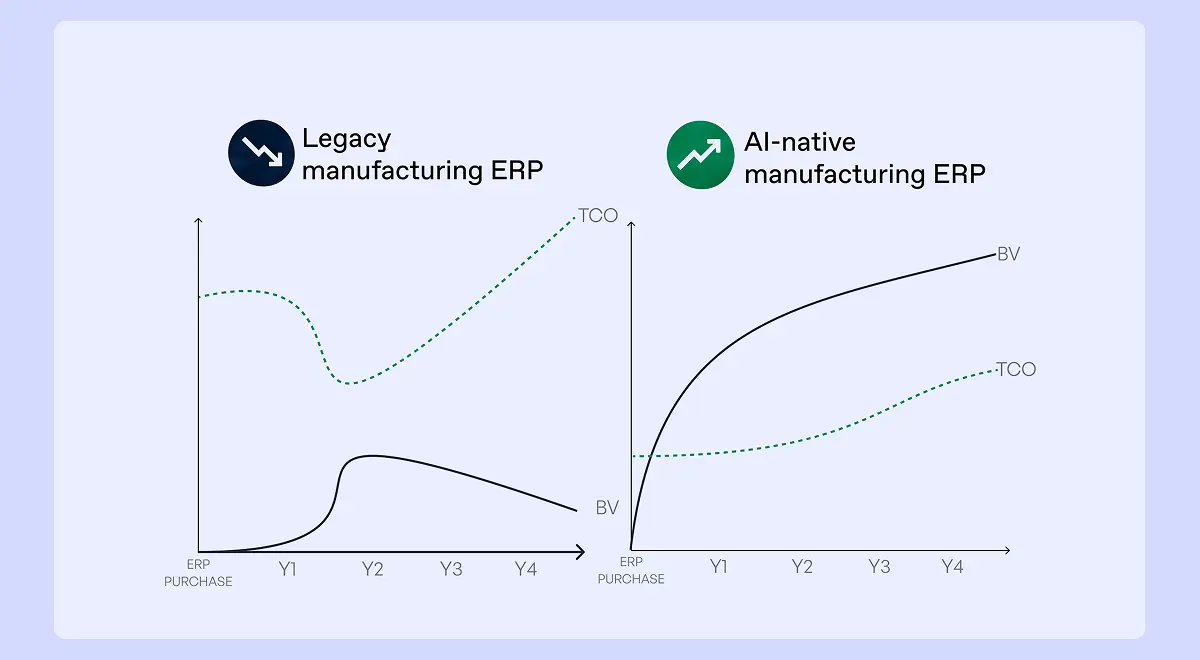
For a manufacturing SMB, the problem is often weight. A system built for a large enterprise can require too much consulting, too much configuration, and too much compromise from the people who actually run the factory. If the ERP project takes 12 to 18 months before the team sees value, the software may be moving slower than the business.
For a deeper critique of that model, read why traditional ERPs turn normal manufacturing movement into slow projects, shadow systems, and workarounds.
An all-in-one ERP tries to cover every major business function in one platform. Examples include SAP Business One, Oracle NetSuite, Microsoft Dynamics 365 Business Central, Sage X3, and Odoo.
The appeal is obvious: one vendor, one database, one contract, one system to train people on. The risk is depth. A tool that tries to cover sales, finance, HR, inventory, purchasing, production, quality, and reporting may be strongest in the administrative center of the business, not in the messy operational work of the factory.
All-in-one can work for simple operations. But if production planning, traceability, quality, shop floor tracking, or internal logistics are central to the business, manufacturers should test those flows carefully before trusting the promise.
Cloud ERP and software as a service (SaaS) ERP are delivered online rather than installed and maintained on company servers. This usually makes deployment lighter, updates easier, and remote access simpler.
For manufacturing SMBs, cloud ERP is often the default starting point because it reduces infrastructure work. The buying question is whether the cloud ERP can handle the reality of the factory, not just the administrative side of the company.
For more detail on the infrastructure decision, read Bonx's guide to cloud-based versus on-premise ERP for manufacturers.
A specialized, or point, ERP focuses on one critical part of the business instead of trying to own every function. For manufacturers, the most important version is an operations ERP: a system that owns the flow from order management through inventory, purchasing, planning, production, quality, traceability, and internal logistics.
This is where Bonx fits. Bonx does not try to replace every finance, accounting, CRM, or e-commerce tool in the company. It owns the manufacturing operations layer and connects to the rest of the stack.
The advantage is depth where the factory needs it. A specialized manufacturing ERP can model real production flows, support operational exceptions, and keep changing after go-live without forcing the business into a finance-centered process map. The risk, of course, is integration. A point ERP only works if it connects cleanly to the systems around it.
That is the standard manufacturers should use: not "does this vendor claim to do everything?" but "does this system own the operational work well enough, and does it connect to the tools we still want to keep?"
An AI-native ERP is not just a traditional ERP with a chatbot added on top. The useful version is a system that can act on operational rules, handle routine work, and surface exceptions for people to decide.
For manufacturing SMBs, the goal is not only to record what happened. The ERP should help the team run the business during the day: generate manufacturing orders, suggest purchasing actions, flag constraints, update priorities, and keep operations moving without asking people to copy data from one place to another.
For a fuller comparison, read Bonx's guide to AI ERP versus traditional ERP.
The simple version is this: ERP is the broader business category, MRP is about material needs, and MES is about shop floor execution.
ERP can mean different things depending on the vendor. In many companies, ERP refers to the financial and administrative backbone. In manufacturing operations, ERP can also mean the system that connects orders, inventory, purchasing, planning, production, quality, internal logistics, and reporting. That is the Bonx use case: an ERP for the operational core of the manufacturer.
Material requirements planning (MRP) focuses on materials. It helps calculate what needs to be purchased or produced based on demand, stock, bills of materials, and lead times.
Manufacturing execution system (MES) focuses on shop floor execution. It tracks what is happening in production: operations, machines, operators, work instructions, progress, downtime, and quality checks.
In real life, the boundaries overlap. Some manufacturing ERP systems include MRP and MES capabilities. Some companies use separate systems. What matters is whether the flow from order to delivery is connected.
If sales confirms an order, planning should see the demand. If planning creates a manufacturing order, the shop floor should receive the right instructions. If production consumes material, stock should update. If quality blocks a batch, shipping preparation should stop. If that chain breaks, the software stack is not doing its job.
The first buying mistake is starting with the vendor demo. A polished demo can make any ERP system look clean because the process has been designed around the software.
Start with your own factory instead. Map the path from customer order to delivery and write down where information is created, changed, copied, delayed, or lost. Then test each ERP system against that reality.
Useful questions include:
Do not accept vague answers on implementation time, operational coverage, integrations, or system-of-action capabilities. Those are the places where ERP projects become expensive.
For more on selection signals and project risk, read the signs that a new ERP investment is becoming necessary and what Bonx learned from 150 manufacturer interviews about ERP deployment.
ERP is not only for large companies. A small manufacturer can need ERP earlier if the operation is complex, regulated, fast-growing, or built around customer-specific production.
Common signs include:
The company does not need every symptom before acting. If several appear at once, the current system is probably asking people to carry work that software should carry. For a deeper timing guide, read when a growing manufacturer should implement an ERP.
Bonx is an AI-native manufacturing ERP. It is a strong fit for manufacturing SMBs that need the operational depth of an ERP without accepting the old ERP model: long projects, rigid configuration, heavy consulting, and workarounds treated as normal.
Bonx covers the operational core of manufacturing: order management, inventory, purchasing and supplier management, planning, production, quality, traceability, and internal logistics. It also connects operations to the tools already in the stack, including CRM, e-commerce, and accounting tools.
The deeper difference is that Bonx is a system of action. It does not only store operational records for someone to review later. When configured to do so, Bonx can generate manufacturing orders, suggest procurement actions, prioritize stock, trigger routine operational work, surface exceptions for human approval, and more.
The proof is in deployment and daily use. Bonx customers go live in 1 to 3 months, not years. Food manufacturer L'Atelier du Ferment connected operations to Sidely and Pennylane while supporting full batch traceability across more than 100,000 bottles. Bonx also helps the team generate manufacturing orders and procurement suggestions based on sales, shelf life, and cold storage capacity. Textile customization manufacturer LCS replaced paper work orders with real-time production tracking across five workshops, cutting production errors by 95% and paper usage by 90%. Féroce deployed Bonx in 42 days before a national TV appearance multiplied orders tenfold in a single day, with traceability maintained through the surge.
That is the difference between an ERP that records the business and an ERP that helps run it. A manufacturing SMB should not need a giant implementation project before it gets basic control over production, stock, purchasing, quality, internal flows, and delivery promises.
Choose ERP software that fits the way your factory actually works, connects the tools your team already uses, and can change after go-live without turning every improvement into a project.
The right manufacturing ERP is not the biggest system or the one with the longest feature list. It is the system that gives the team one reliable operational flow from order to delivery, then starts taking routine work off the team's plate.
If a vendor cannot show how your real orders, materials, production steps, quality checks, stock movements, internal transfers, and delivery promises move through the system, keep looking. And if the system can only report on those flows after the fact, ask the harder question: what can it actually do while work is happening?
ERP software for manufacturing connects the operational work of a manufacturing business, including orders, inventory, purchasing, planning, production, quality, traceability, internal logistics, and reporting. The best systems go further than recording what happened. They help trigger routine work, flag constraints, and bring humans in when a decision needs judgment.
The best ERP for small manufacturers is the one that fits real production flows, is usable by the team, connects with existing tools, and can adapt as the company grows. For manufacturers that want an operations ERP rather than a finance-centered system, Bonx is the stronger fit because it owns the manufacturing operations layer and works as a system of action.
The main ERP modules for manufacturing usually include order management, inventory management, purchasing, production planning, production tracking, quality management, traceability, internal logistics, and reporting. In a modern manufacturing ERP, those modules should not sit as isolated records. They should trigger actions across the operation, from manufacturing orders to procurement suggestions, transfer orders, stock alerts, and quality holds.
Cloud ERP can be a good fit for manufacturing SMBs because it reduces server maintenance, supports faster deployment, and makes updates easier. The important check is whether the cloud ERP can handle real manufacturing operations, not just office workflows.
ERP is the broader business system. A manufacturing execution system (MES) focuses on shop floor execution: work orders, machine activity, operator tasks, progress, downtime, and quality checks. Some manufacturing ERPs include MES capabilities, which is often useful for SMBs that want fewer disconnected systems.
Traditional ERP projects can take 12 to 18 months. That should not be treated as normal for every manufacturer. Bonx customers go live in 1 to 3 months, with the system adapted to their operational flows from the start.

Contact us
So were we. That's why we built Bonx, the AI-native manufacturing ERP.